
springboot双数据源将原mybatis框架兼容mybatisPlus
符号
阅读:1005
2021-04-01 11:08:56
评论:0

总结一下:
1.修改依赖
2.修改application.xml 配置mybatisPlus
3.修改数据源配置类
4.方便开发可以引用代码生成器
1.将mybatis依赖去除,并引入mybatisPlus依赖,mybatisPlus中已经集成了mybatis
	<!-- <dependency>
			<groupId>org.mybatis.spring.boot</groupId>
			<artifactId>mybatis-spring-boot-starter</artifactId>
			<version>${mybatis-spring-boot.version}</version>
		</dependency> -->

		<!-- 引入mybatis-plus-boot-starter -->
		<dependency>
			<groupId>com.baomidou</groupId>
			<artifactId>mybatis-plus-boot-starter</artifactId>
			<version>3.0.6</version>
		</dependency>
		<!-- 这两个依赖 使用代码生成器,需要引入模板引擎 -->
		<dependency>
			<groupId>org.apache.velocity</groupId>
			<artifactId>velocity</artifactId>
			<version>1.7</version>
		</dependency>
		<dependency>
			<groupId>org.freemarker</groupId>
			<artifactId>freemarker</artifactId>
			<version>2.3.28</version>
		</dependency>
			<!-- lombok -->
		<dependency>
			<groupId>org.projectlombok</groupId>
			<artifactId>lombok</artifactId>
			<optional>true</optional>
		</dependency>
2.application.yml中添加mybatisPlus配置去掉mybatis配置
# 如果是放在src/main/java目录下 classpath:/com/yourpackage/*/mapper/*Mapper.xml
# 如果是放在resource目录 classpath:/mapper/*Mapper.xml
#mybatis-plus-mapper-locations: classpath:com/zklt/bigdata/web/demo/dao/*.xml
#实体扫描,多个package用逗号或者分号分隔
mybatis-plus-typeAliasesPackage: bw.gkz.svc.db.model
#主键类型  0:"数据库ID自增", 1:"用户输",2:"全局唯一ID (数字类型唯一ID)", 3:"全局唯一ID UUID";
mybatis-plus-global-config-id-type: 3
#字段策略 0:"忽略判断",1:"非 NULL 判断"),2:"非空判断"
mybatis-plus-global-config-field-strategy: 2
#驼峰下划线转换
mybatis-plus-global-config-db-column-underline: true
#刷新mapper 调试神器
#refresh-mapper: true
#数据库大写下划线转换
#capital-mode: true
# Sequence序列接口实现类配置
mybatis-plus-global-config-key-generator: com.baomidou.mybatisplus.incrementer.OracleKeyGenerator
#逻辑删除配置(下面3个配置)
mybatis-plus-global-config-logic-delete-value: 1
mybatis-plus-global-config-logic-not-delete-value: 0
mybatis-plus-global-config-sql-injector: com.baomidou.mybatisplus.mapper.LogicSqlInjector
#自定义填充策略接口实现
mybatis-plus-global-config-meta-object-handler: com.baomidou.springboot.MyMetaObjectHandler
mybatis-plus-global-config-configuration:
#配置返回数据库(column下划线命名&&返回java实体是驼峰命名),自动匹配无需as(没开启这个,SQL需要写as: select user_id as userId)
mybatis-plus-global-config-map-underscore-to-camel-case: true
mybatis-plus-global-config-cache-enabled: false
#配置JdbcTypeForNull, oracle数据库必须配置
mybatis-plus-global-config-jdbc-type-for-null: 'null'


#去除原mybatis配置
#mybatis:
#  mapper-locations: classpath*:bw/gkz/svc/db/mapper/**/*.xml
#  configuration:
#    log-impl: org.apache.ibatis.logging.log4j2.Log4j2Impl
3.数据库配置
spring:
  #MySQL数据库
  datasource:
    main:
      jdbc-url: jdbc:mysql://192.168.2.101:3306/gkz_01?useUnicode=true&characterEncoding=UTF-8&allowMultiQueries=true&serverTimezone=GMT%2B8
      username: gmp
      password: bw.2018
    voc:
      jdbc-url: jdbc:mysql://192.168.2.101:3306/demo_voc?useUnicode=true&characterEncoding=UTF-8&allowMultiQueries=true&serverTimezone=GMT%2B8
      username: gmp
      password: bw.2018
4.主库配置类
/** 定义数据源配置-主库 */
@Configuration
@MapperScan(basePackages="bw.gkz.svc.db.dao.m", sqlSessionFactoryRef="mainSqlSessionFactory")
public class DataSourceMainConfig
{
	@Primary													//表示这个数据源是默认数据源
	@Bean("mainDataSource")										//将这个对象放入Spring容器中
	@ConfigurationProperties(prefix="spring.datasource.main")	//读取配置文件中的参数,并指定参数名的前缀
	public DataSource getDataSource()
	{
		return DataSourceBuilder.create().build();
	}

	@Primary
	@Bean("mainSqlSessionFactory")
	public SqlSessionFactory mainSqlSessionFactory(@Qualifier("mainDataSource") DataSource datasource) throws Exception
	{
		 MybatisSqlSessionFactoryBean sqlSessionFactory = new MybatisSqlSessionFactoryBean();
	        sqlSessionFactory.setDataSource(datasource);
	        MybatisConfiguration configuration = new MybatisConfiguration();
	        configuration.setDefaultScriptingLanguage(MybatisXMLLanguageDriver.class);
	        configuration.setJdbcTypeForNull(JdbcType.NULL);
	        sqlSessionFactory.setConfiguration(configuration);
	        sqlSessionFactory.setMapperLocations(new PathMatchingResourcePatternResolver()
	                .getResources("classpath:bw/gkz/svc/db/mapper/m/*.xml"));
	        sqlSessionFactory.setPlugins(new Interceptor[]{
	                new PaginationInterceptor(),
	                new PerformanceInterceptor(),
	                new OptimisticLockerInterceptor()
	        });
	        return sqlSessionFactory.getObject();
	}

	@Primary
	@Bean("mainSqlSessionTemplate")
	public SqlSessionTemplate mainSqlSessionTemplate(@Qualifier("mainSqlSessionFactory") SqlSessionFactory sessionfactory)
	{
		return new SqlSessionTemplate(sessionfactory);
	}

	@Bean("mainTransactionManager")
	@Primary
	public PlatformTransactionManager mainTransactionManager(@Qualifier("mainDataSource")DataSource dataSource) {
		return new DataSourceTransactionManager(dataSource);
	}
}
5.第二个数据库配置类
/** 定义数据源配置-VOC库 */
@Configuration
@MapperScan(basePackages="bw.gkz.svc.db.dao.v", sqlSessionFactoryRef="vocSqlSessionFactory")
public class DataSourceVocConfig
{
	@Bean("vocDataSource")										//将这个对象放入Spring容器中
	@ConfigurationProperties(prefix="spring.datasource.voc")	//读取配置文件中的参数,并指定参数名的前缀
	public DataSource getDataSource()
	{
		return DataSourceBuilder.create().build();
	}

	@Bean("vocSqlSessionFactory")
	public SqlSessionFactory vocSqlSessionFactory(@Qualifier("vocDataSource") DataSource datasource) throws Exception
	{
		 MybatisSqlSessionFactoryBean sqlSessionFactory = new MybatisSqlSessionFactoryBean();
	        sqlSessionFactory.setDataSource(datasource);
	        MybatisConfiguration configuration = new MybatisConfiguration();
	        configuration.setDefaultScriptingLanguage(MybatisXMLLanguageDriver.class);
	        configuration.setJdbcTypeForNull(JdbcType.NULL);
	        sqlSessionFactory.setConfiguration(configuration);
	        sqlSessionFactory.setMapperLocations(new PathMatchingResourcePatternResolver()
	                .getResources("classpath:bw/gkz/svc/db/mapper/v/*.xml"));
	        sqlSessionFactory.setPlugins(new Interceptor[]{
	                new PaginationInterceptor(),
	                new PerformanceInterceptor(),
	                new OptimisticLockerInterceptor()
	        });
	        return sqlSessionFactory.getObject();
	}

	@Bean("vocSqlSessionTemplate")
	public SqlSessionTemplate vocSqlSessionTemplate(@Qualifier("vocSqlSessionFactory") SqlSessionFactory sessionfactory)
	{
		return new SqlSessionTemplate(sessionfactory);
	}

	@Bean("vocTransactionManager")
	public PlatformTransactionManager vocTransactionManager(@Qualifier("vocDataSource")DataSource dataSource) {
		return new DataSourceTransactionManager(dataSource);
	}
}
配置类差别:
mybatis:
@Primary
	@Bean("mainSqlSessionFactory")
	public SqlSessionFactory mainSqlSessionFactory(@Qualifier("mainDataSource") DataSource datasource) throws Exception {
		SqlSessionFactoryBean bean = new SqlSessionFactoryBean();
		bean.setDataSource(datasource);
		bean.setMapperLocations(new PathMatchingResourcePatternResolver().getResources("classpath:bw/yszc/svc/db/mapper/m/*.xml")); // xml位置
		return bean.getObject();
	}
mybatisPlus:
@Primary
	@Bean("mainSqlSessionFactory")
	public SqlSessionFactory mainSqlSessionFactory(@Qualifier("mainDataSource") DataSource datasource) throws Exception
	{
		 MybatisSqlSessionFactoryBean sqlSessionFactory = new MybatisSqlSessionFactoryBean();
	        sqlSessionFactory.setDataSource(datasource);
	        MybatisConfiguration configuration = new MybatisConfiguration();
	        configuration.setDefaultScriptingLanguage(MybatisXMLLanguageDriver.class);
	        configuration.setJdbcTypeForNull(JdbcType.NULL);
	        sqlSessionFactory.setConfiguration(configuration);
	        sqlSessionFactory.setMapperLocations(new PathMatchingResourcePatternResolver()
	                .getResources("classpath:bw/gkz/svc/db/mapper/m/*.xml"));
	        sqlSessionFactory.setPlugins(new Interceptor[]{
	                new PaginationInterceptor(),
	                new PerformanceInterceptor(),
	                new OptimisticLockerInterceptor()
	        });
	        return sqlSessionFactory.getObject();
	}
**6.代码生成器生成controller,service,mapper,mapper.xml,entity
public class MpGenerator {

	public static void main(String[] args) {

		GlobalConfig config = new GlobalConfig();

		String dbUrl = "jdbc:mysql://localhost:3306/test?useUnicode=true&characterEncoding=utf-8&useSSL=false&serverTimezone=UTC";

		DataSourceConfig dataSourceConfig = new DataSourceConfig();

		dataSourceConfig.setDbType(DbType.MYSQL)

		.setUrl(dbUrl)

		.setUsername("root")

		.setPassword("root")

		.setDriverName("com.mysql.cj.jdbc.Driver");

		StrategyConfig strategyConfig = new StrategyConfig();

		strategyConfig

		.setCapitalMode(true)

		// 这里结合了Lombok,所以设置为true,如果没有集成Lombok,可以设置为false

				.setEntityLombokModel(true)

				.setNaming(NamingStrategy.underline_to_camel);

		// 这里因为我是多模块项目,所以需要加上子模块的名称,以便直接生成到该目录下,如果是单模块项目,可以将后面的去掉

		String projectPath = System.getProperty("user.dir") + "/demo-mybatisplus";

		// 自定义配置

		InjectionConfig cfg = new InjectionConfig() {

			@Override
			public void initMap() {

			}

		};

		// 如果模板引擎是 freemarker

		String templatePath = "/templates/mapper.xml.ftl";

		// 如果模板引擎是 velocity

		// String templatePath = "/templates/mapper.xml.vm";

		// 自定义输出配置

		List<FileOutConfig> focList = new ArrayList<>();

		// 自定义配置会被优先输出

		focList.add(new FileOutConfig(templatePath) {

			@Override
			public String outputFile(TableInfo tableInfo) {

				// 自定义输出文件名

				return projectPath + "/src/main/resources/mapper/" + "user"

				+ "/" + tableInfo.getEntityName() + "Mapper" + StringPool.DOT_XML;

			}

		});

		cfg.setFileOutConfigList(focList);

		// 设置作者,输出路径,是否重写等属性

		config.setActiveRecord(false)

		.setEnableCache(false)

		.setAuthor("weilai")

		.setOutputDir(projectPath + "/src/main/java")

		.setFileOverride(true)

		.setServiceName("%sService");

		new AutoGenerator()

		.setGlobalConfig(config)

		.setDataSource(dataSourceConfig)

		.setStrategy(strategyConfig)

		.setTemplateEngine(new FreemarkerTemplateEngine())

		.setCfg(cfg)

		// 这里进行包名的设置

				.setPackageInfo(

				new PackageConfig()

				.setParent("com.example.demo3")

				.setController("controller")

				.setEntity("entity")

				.setMapper("mapper")

				.setServiceImpl("service.impl")

				.setService("service")

				).execute();

	}

}
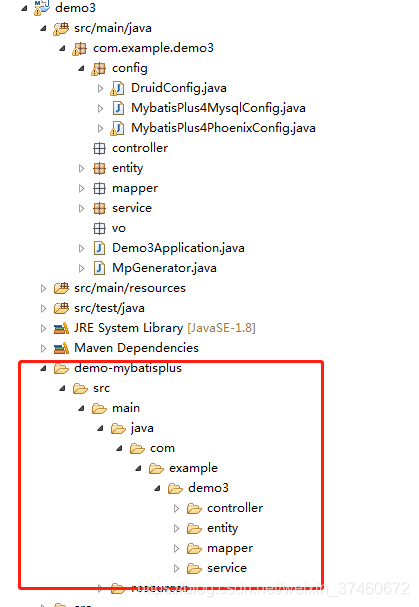
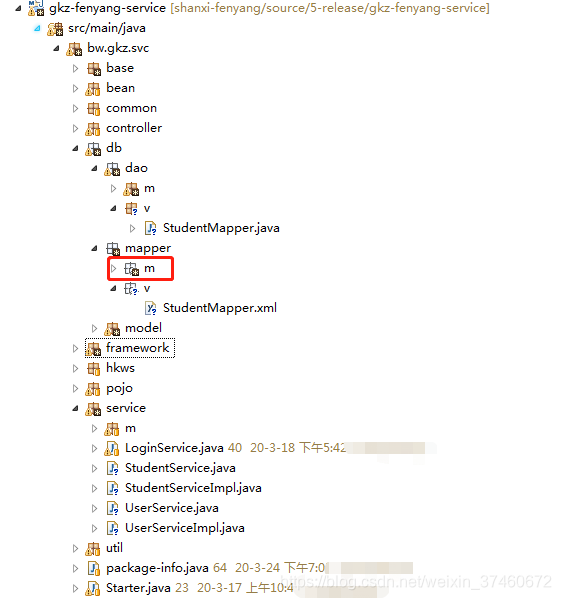
user相关的文件在m包下,文件太多干扰截图就不打开了
7.我测试的sql
主库:
SET FOREIGN_KEY_CHECKS=0;

-- ----------------------------
-- Table structure for `user`
-- ----------------------------
DROP TABLE IF EXISTS `user`;
CREATE TABLE `user` (
  `id` int(11) NOT NULL AUTO_INCREMENT COMMENT '用户id,主键',
  `use_name` varchar(255) DEFAULT NULL COMMENT '用户名',
  `password` varchar(255) DEFAULT NULL COMMENT '用户密码',
  PRIMARY KEY (`id`) USING BTREE
) ENGINE=MyISAM AUTO_INCREMENT=13 DEFAULT CHARSET=utf8 ROW_FORMAT=DYNAMIC;

-- ----------------------------
-- Records of user
-- ----------------------------
INSERT INTO `user` VALUES ('1', '', '12312312');
INSERT INTO `user` VALUES ('2', '111', '12312312');
INSERT INTO `user` VALUES ('4', '12312', '12312312');
INSERT INTO `user` VALUES ('5', '12312', 'zhangsan');
INSERT INTO `user` VALUES ('6', '12312', 'zhangsan');
INSERT INTO `user` VALUES ('7', '12312', 'zhangsan');
INSERT INTO `user` VALUES ('8', '12312', 'zhangsan');
INSERT INTO `user` VALUES ('9', '12312', 'zhangsan');
INSERT INTO `user` VALUES ('10', '12312', 'zhangsan');
INSERT INTO `user` VALUES ('11', '12312', 'zhangsan');
INSERT INTO `user` VALUES ('12', '12312', 'zhangsan');
次库:
SET FOREIGN_KEY_CHECKS=0;

-- ----------------------------
-- Table structure for `student`
-- ----------------------------
DROP TABLE IF EXISTS `student`;
CREATE TABLE `student` (
  `id` int(11) NOT NULL AUTO_INCREMENT COMMENT '用户id,主键',
  `student_name` varchar(255) DEFAULT NULL COMMENT '用户名',
  `password` varchar(255) DEFAULT NULL COMMENT '用户密码',
  PRIMARY KEY (`id`) USING BTREE
) ENGINE=MyISAM AUTO_INCREMENT=3 DEFAULT CHARSET=utf8 ROW_FORMAT=DYNAMIC;

-- ----------------------------
-- Records of student
-- ----------------------------
INSERT INTO `student` VALUES ('1', 'wbliu', 'wbliu');
INSERT INTO `student` VALUES ('2', 'wbliu001', 'wbliu001');
8.检查xml文件中映射的dao路径,没问题测试一下
@RunWith(SpringRunner.class)
@SpringBootTest
public class Demo3ApplicationTests {
	@Autowired
	private UserService userService;
	@Autowired
	private StudentService studentService;
	@Test
	public void getMybatisPlusUser() {
		User byId = userService.getById(1);
		System.out.println("user:==" + byId);
		Student byId2 = studentService.getById(1);
		System.out.println("student:==" + byId2);
	}
}
输出结果:

到此处springboot双数据源在原有的mybatis基础上集成mybatisPlus就完成了
总结一下:
1.修改依赖
2.修改application.xml 配置mybatisPlus
3.修改数据源配置类
4.方便开发可以引用代码生成器

声明
1.本站遵循行业规范,任何转载的稿件都会明确标注作者和来源;2.本站的原创文章,请转载时务必注明文章作者和来源,不尊重原创的行为我们将追究责任;3.作者投稿可能会经我们编辑修改或补充。

